
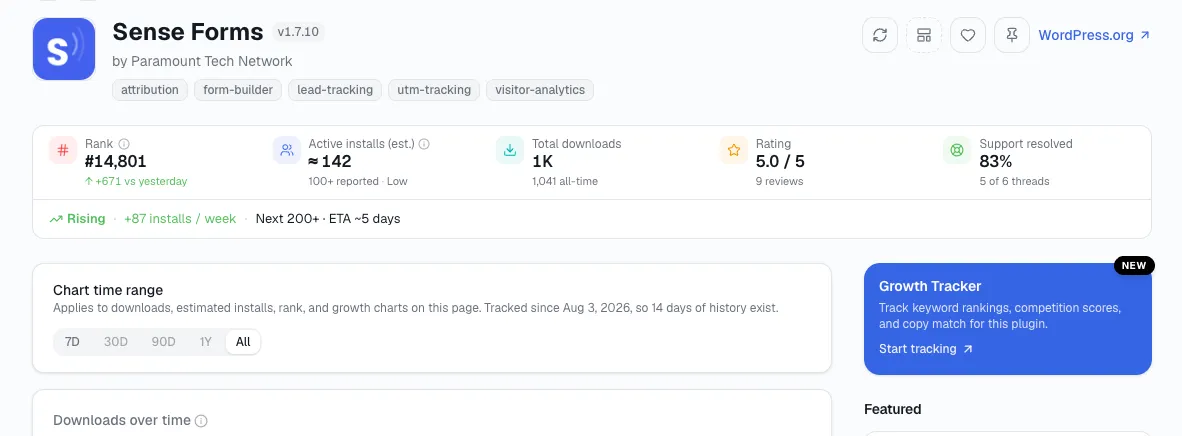
Using downloads and active installs to measure WordPress plugin growth means reading them as two different questions. Downloads is the running total of every install ever, added up over the plugin's whole life. Active installs is who's actually still running it right now - and the gap between the two grows every time someone installs and later removes the plugin.
This is a different lens from tracking one number's month-over-month change, which is its own separate technique. That method watches active installs move over time; this one watches two different numbers against each other at the same point in time. They're complementary, not interchangeable - and they catch different problems.
The condensed version: To measure WordPress plugin growth with downloads and active installs, read them as two different questions - downloads is the running total ever, active installs is who's actually still running it now, and the growing gap between the two is a rough proxy for churn.
Two numbers, two different questions
| Downloads | Active installs | |
|---|---|---|
| Answers | How many times has this ever been installed? | How many sites have it right now? |
| Can it fall? | Never | Yes |
| Counts updates/reinstalls? | Yes, each one | No, current state only |
Downloads only ever goes up. It counts every reinstall and every eventual uninstall the same way, and nothing about removing the plugin ever subtracts from it. Active installs is the only one of the two that can fall, which is exactly what makes it the number worth watching for actual growth or decline.
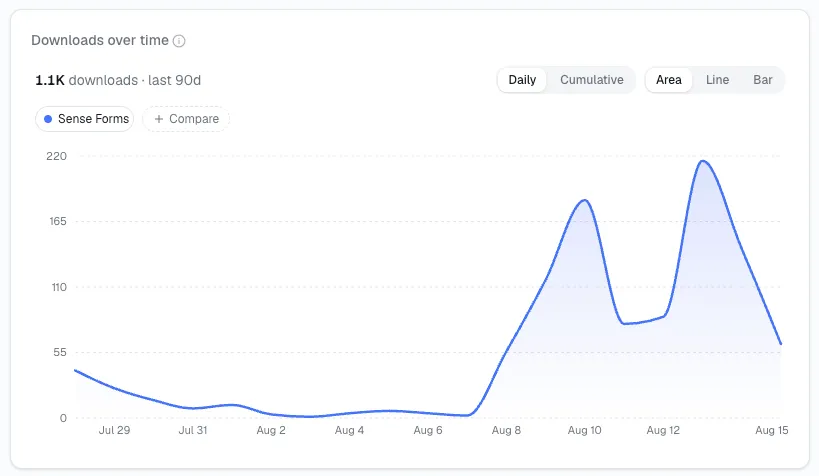
The gap between them is a rough churn signal
Subtract active installs from total downloads, loosely, and you get a number that roughly tracks every install that didn't stick. It's a rough stand-in for churn, not an exact count - downloads also counts updates and reinstalls, so the gap overstates true churn somewhat. What matters more than the size of the gap at any one moment is how it changes over time.
Here's an example I like to use: say a plugin shows 40,000 total downloads and 12,000 active installs this quarter, and the same comparison a year ago was 25,000 downloads against 10,000 active installs. The gap widened from 15,000 to 28,000 - nearly doubling - while active installs grew by only 2,000. I read that as a rising share of everyone who's ever tried the plugin not sticking with it, even while the headline active-install number still shows growth.
Tracking that change from one month to the next runs into the same rounding-noise problem covered in measuring plugin growth month over month - a small move in the gap can be noise, so treat a single month's shift the same cautiously.
Why this catches something growth alone won't
A plugin can show flat or slightly positive active-install growth while quietly cycling through a much larger number of new users who don't stick - strong top-of-funnel interest masking a retention problem underneath it. Downloads and active installs, read separately, both look acceptable. The widening gap between them is what actually shows the leak.
This is precisely the blind spot I've seen watching active installs alone, month over month, miss - that method tells you the current headcount is holding steady, not that you're losing a growing share of the people who try the plugin in the first place. The two techniques are answering different questions side by side, which is why neither one replaces the other.
What else widens the gap, besides churn
The gap isn't a pure churn measurement, and treating it as one will overstate how many users you've actually lost. A few things inflate it that have nothing to do with anyone leaving:
Version updates. Depending on how a plugin's updates are counted, some update mechanisms add to the downloads total without representing a new user at all.
Multi-site reinstalls. A user who uninstalls and reinstalls the same plugin on the same site - troubleshooting a conflict, say - adds to downloads twice for one person.
Staging and development copies. Developers testing a plugin across staging environments generate downloads that were never going to become a long-term active install in the first place.
I don't think any of these make the gap meaningless - they just mean it's a directional signal, not a precise headcount. Watch whether it's widening or narrowing over time rather than treating any single gap size as an exact churn number.
See both numbers side by side, without doing the math yourself
Open your plugin's page on StatWP (or your theme's) and search its name - total downloads and estimated active installs sit side by side, along with downloads over a recent 30-day window, so watching the gap's direction over time is something you can do as part of the regular monthly check rather than a one-off calculation.
Compare Downloads vs Active Installs
Reading the gap against growth, not instead of it
I use the gap mostly as a check against whatever the active-install growth number is already telling me, not as a standalone verdict. Four combinations show up in practice:
Growing installs, narrowing gap. The strongest position - new users are arriving and staying at a higher rate than before.
Growing installs, widening gap. Still net-positive, but worth watching - you're gaining users overall while losing a rising share of the people who try the plugin.
Flat or falling installs, narrowing gap. A smaller but more loyal base - fewer new downloads arriving, but the ones who do stay.
Flat or falling installs, widening gap. The combination worth addressing first - new downloads are arriving and leaving faster than ever, on top of an already-stalled headline number.
None of these four require anything beyond the same two numbers, read together instead of separately.
Questions about reading the gap
Is a wide gap always bad? Not by itself, in my experience - an older, well-established plugin will naturally have a wider gap than a brand-new one, simply because it's had more years to accumulate downloads. What matters is whether the gap is widening faster than active installs is growing, not its absolute size.
How is this different from just tracking active installs month over month? That method - covered separately in measuring growth month over month - uses one data type, active installs, compared across time. This technique uses two data types, downloads and active installs, compared against each other at the same point in time. Run both; they catch different problems.
Can the gap ever narrow? Yes, if active-install growth outpaces new downloads for a stretch - a plugin retaining nearly everyone who tries it, with few new downloads arriving, will show the gap holding steady or even narrowing slightly as a share of the total.
Should I compare the gap as a raw number or as a percentage of downloads? I'd say percentage, for the same reason percentages beat raw numbers throughout growth tracking - a 5,000-install gap means something different for a plugin with 10,000 downloads than one with 500,000. Track the gap as a share of total downloads if you're comparing your own plugin's trend across a long stretch of time.
Fold it into the wider routine
This gap is one input into the monthly growth-tracking check, specifically the question about whether downloads are moving with active installs or diverging from them, for a plugin or a theme. Once you've read the gap, the next questions in the same routine are momentum and rank - see what plugin momentum actually means for the signal that usually moves first.