
Before you build a new WordPress plugin — or a new feature for one that already exists — the fastest research you can do is read what people already hate about a plugin that's live in that space right now. Their 1- to 4-star reviews on WordPress.org are a public list of everything that product still gets wrong, sitting there for free.
StatWP's Review Gap Finder is built for exactly this: point it at any plugin's (or theme's) reviews — a competitor's, or one you're simply sizing up as a market opportunity — and it groups the complaints into topics and ranks them by severity, so you can see what that plugin's own users wish existed.
The short of it: To turn a plugin's bad reviews into your next feature idea, read its 1- to 4-star WordPress.org reviews for the complaint pattern - StatWP's Review Gap Finder groups those complaints into topics and ranks them by severity for you.
Why Read Someone Else's Bad Reviews at All?
An established plugin with real usage has months or years of unfiltered feedback attached to it. That feedback is more reliable than guessing at what a niche needs, because every complaint came from someone who actually installed the thing, used it, and hit a wall.
Read enough of those reviews and the same handful of underlying issues repeat, worded a dozen different ways. I read that repetition as a map — not of your own product, but of a gap in the market you could build into.
Which Plugin Should You Actually Point This At?
Two situations call for this kind of research, and neither requires that you already have a competing product live:
- A direct competitor. If you already sell a plugin in a category, running this against the biggest name in that category shows you where they're losing users — the exact opening to build toward. The same logic applies if you build themes instead.
- An established plugin in a niche you're considering entering. You don't need a product yet. Reading what a niche's existing plugin gets wrong is a cheap way to test whether there's a real opening before you write a line of code.
You can also run the same analysis on your own plugin if you already have one live — that's a legitimate secondary use of the tool. But it's not the point of this post, and it's not the strongest use of Review Gap Finder either. The stronger use is pointing it at a product you don't own.
What Review Gap Finder Actually Shows You
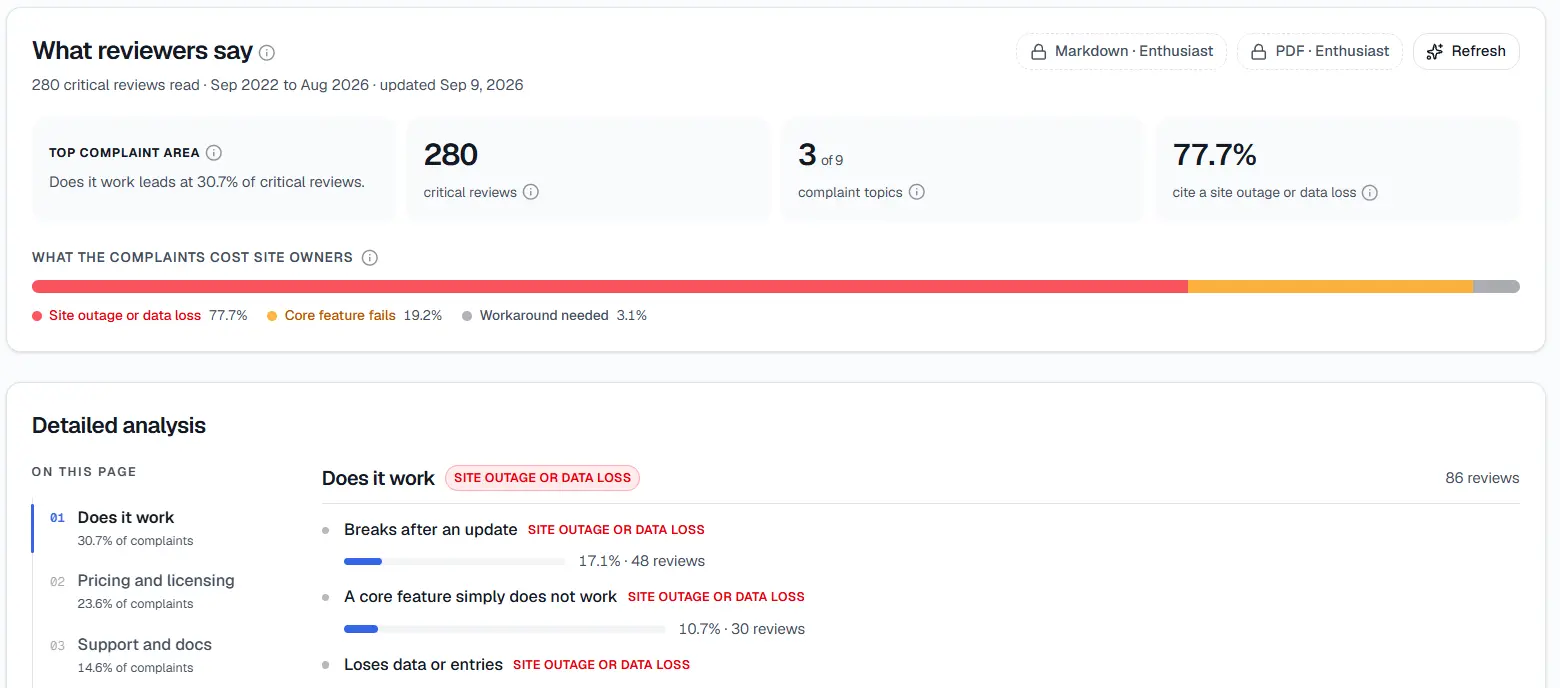
The overview Review Gap Finder returns for a plugin's critical reviews — top complaint area, topic count, and cost breakdown.
Review Gap Finder reads a plugin's WordPress.org reviews across the full 1-star to 4-star range — not just the angriest 1-star reviews — and uses AI to group them into complaint topics, then ranks those topics by severity. Instead of a wall of individual star ratings, you're looking at a handful of named clusters, sorted by how much they actually hurt.
The 4-star reviews matter more than they might sound like they would. A reviewer who gives four stars still likes the plugin enough to almost recommend it — "great plugin, but I wish it did X" is close to a feature request written by someone who's already a customer of that category. That's often higher-signal than a 1-star rage review from someone who never really understood what the plugin was for — this is the shape I usually see.
Review Gap Finder sits in the free tier of StatWP's account features, alongside tools like niche research and Growth Tracker — a free account gets you review analysis with casual usage limits, and a paid plan (StatWP's Enthusiast and Power User tiers, billed through Dodo Payments) raises those caps and adds export options for taking the data elsewhere.
Here's the pattern I keep running into: what it gives you is a starting map, not a finished decision. Grouping reviews into topics and ranking them by severity tells you where the complaints cluster and how bad each cluster is — it doesn't tell you on its own whether a cluster is a real product gap, a shared limitation every plugin in that category has, or something that was never really the plugin's fault. That judgment call is still yours, and the rest of this series covers how to make it.
A Four-Step Workflow: From Someone Else's Reviews to a Feature List
Here's the actual sequence, from a raw pile of another plugin's reviews to a short list of ideas worth building.
- Pick the plugin and pull its reviews. Start with the full 1- to 4-star range, not just the worst-rated ones — a 4-star "wish it did X" review is often the clearest feature idea in the whole set.
- Let Review Gap Finder group them into complaint topics and rank them by severity. The goal is the same either way: turn a hundred individual reviews into a handful of named, ranked issues. Reading past the vague language to the real complaint is its own skill worth doing carefully once you're inside a cluster.
- Check whether each pattern is fresh or chronic. A cluster of complaints that all started after the plugin's last release means something different than one that's been showing up for two years. Telling those apart tells you whether you're looking at a temporary bug or a standing gap worth building for.
- Decide which patterns are actually worth building something for. Not every complaint topic is an opportunity — some are rare, some are a pain nobody would pay to fix. Turning the ranked list into an actual short list is what makes this a research process instead of just a summary.
Where This Fits Next to StatWP's Other Research Tools
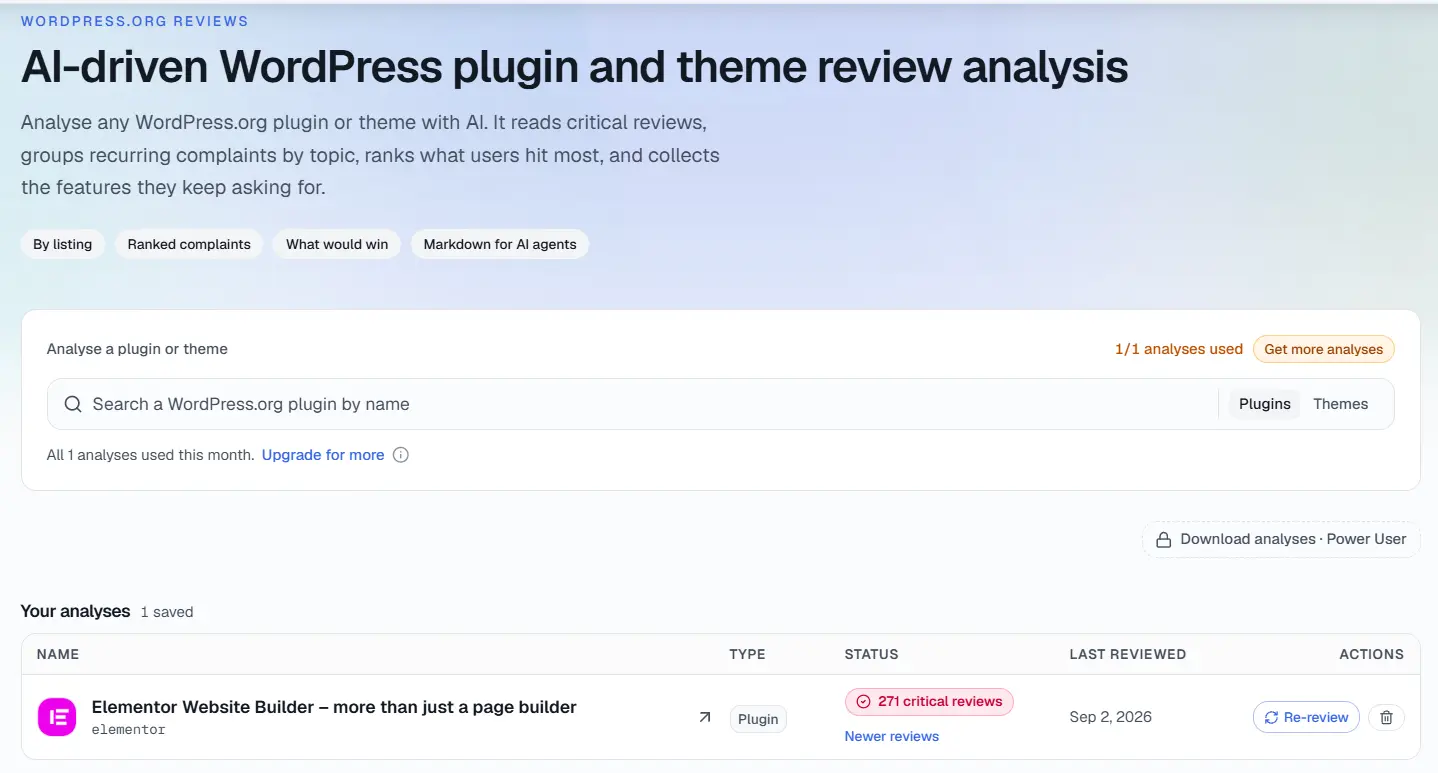
Starting a new analysis — search any plugin or theme's slug and Review Gap Finder reads its critical reviews for you.
Review analysis answers a narrower question than StatWP's other research tools, and it's worth being clear about which one. Niche research tells you whether a market has room for another plugin before you build anything. Growth tracking tells you whether a plugin — yours or someone else's — is gaining or losing ground over time, using installs and download trends.
Review Gap Finder answers a different question: not whether a plugin is growing, but what's actively working against that growth from the inside. A plugin can be gaining installs and still be leaking goodwill through a handful of unfixed problems that show up over and over in its own reviews — growth tracking shows you the net number, Review Gap Finder shows you why the number isn't higher, which is exactly the opening a new feature or a new competing plugin can be built around.
What a Complaint Topic Doesn't Tell You on Its Own
I categorize a named, severity-ranked cluster of complaints as a starting point, not a verdict. Two things it won't do for you automatically:
- It won't tell you whether the issue is a real product gap or a hosting/theme/plugin conflict the reviewer is misattributing to the plugin itself — that distinction takes its own read, and skipping it means you could end up building a feature to fix something that was never really the plugin's fault.
- It won't tell you whether an issue is specific to the one plugin you checked or endemic to the whole category. Checking more than one plugin in the same space answers that — and it's the most common way people actually use this tool.
Frequently Asked Questions
Do I need a paid StatWP plan to see complaint topics at all?
No. Review analysis is part of StatWP's free account features, alongside niche research and Growth Tracker, with casual usage limits on a free account. Paid plans raise those limits and add export options — they don't gate the feature itself.
Does this only look at 1-star reviews?
No — Review Gap Finder analyzes the full 1-star to 4-star range. A 4-star review is often the highest-signal complaint of all, since the reviewer liked the plugin enough to almost give it top marks.
Do I need to already have a competing plugin to use this?
No. Running this against an established plugin in a niche you're only considering entering is a normal, cheap way to test whether there's a real opening before you build anything.
Can I run this on my own plugin's reviews instead?
Yes — that's a valid secondary use of the same tool. It just isn't the strongest use of it, which is pointing it at a plugin you don't own to find out what its users wish existed.
How is this different from just reading a plugin's reviews page on WordPress.org?
WordPress.org lists reviews chronologically with no topic grouping and no severity ranking. Reading them in order works for a small number of reviews, but it doesn't surface which complaint is actually the most repeated or the most severe once a plugin has built up a real review history.
Does grouping reviews into topics replace reading the individual reviews myself?
No — I regard a complaint topic as a pointer to where to read closely, not a substitute for reading. The topic tells you where the pattern is; the individual reviews underneath it tell you what's actually going wrong.
A feature idea built from clustered, severity-ranked complaints beats a feature idea built from a hunch. Pick a plugin, pull its full 1- to 4-star reviews, let Review Gap Finder group and rank them, and read what's left as a map of what that plugin's users wish existed — that's the whole workflow, and each step gets its own closer look elsewhere in this series.