
Finding an opportunity in a crowded WordPress plugin market means working through two specific seams instead of walking away at the word "crowded" - what the leading plugins all fail to do despite dominating installs, and how much of the rest of the crowd has actually gone quiet behind a listing count that looks intact.
This picks up after a niche has already been diagnosed as crowded. If you haven't run that diagnosis yet, start with telling whether a niche is actually saturated - this post is the response, not the test.
View Top Plugins by Install Share
The five-step playbook for a crowded niche
Step 1: Confirm the diagnosis before you spend time here
Don't work these two seams on a niche you haven't actually confirmed is crowded. Run the three-number saturation check first - top-3 install share, maintained share, and median rating - and only continue here if it comes back genuinely saturated. If it scored as open instead, with low concentration, the more direct move is finding underserved niches rather than working these seams.
This matters because the two seams below assume a specific starting condition: real installs, real competition, nothing obviously broken about the category. Working them on a niche that's actually just underserved, or genuinely dying, wastes the effort - the seams are built to find cracks in a market that's otherwise working, not to explain why a weak market is weak.
Step 2: Pull the leaders by install share
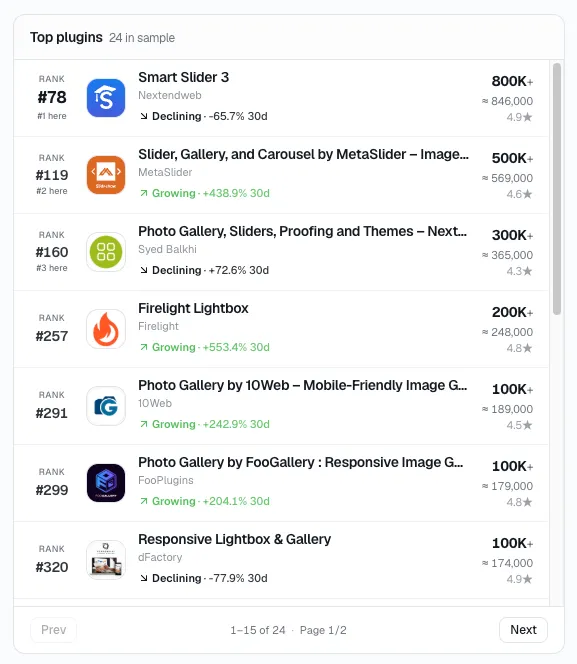
Open StatWP's Niche Research tool - plugin or theme niches both work - and pull the top three to five listings by install share for your niche. In my view, these are the plugins any new entrant is actually competing against - everything from here forward is about finding what they're not doing, not about competing on their own terms.
Step 3: Read for seam one - what the leaders all skip
Read the reviews and support threads for each of those top listings for one specific thing: a complaint that shows up against more than one of them. If the same feature request or the same limitation appears across several leading plugins that otherwise compete directly with each other, it isn't a gap any one of them accidentally left open - in my view, it's something the whole approach to the category tends to miss, which makes it a stronger opportunity than a complaint against just one plugin would be.
A complaint against only the #1 plugin might just mean the #2 or #3 already solves it - check the others before treating a single-plugin complaint as a category-wide gap.
Step 4: Run the abandonment scan for seam two
A niche with thirty listings and a high top-3 install share can still be hiding a second story: a meaningful share of the other twenty-seven might be genuinely stale, and one or two of those might carry an install base worth noticing before they're formally abandoned. Run the niche through StatWP's abandonment scanner - the same scanner whether the niche is plugins or themes - to surface that group directly, rather than opening all twenty-seven listings by hand.
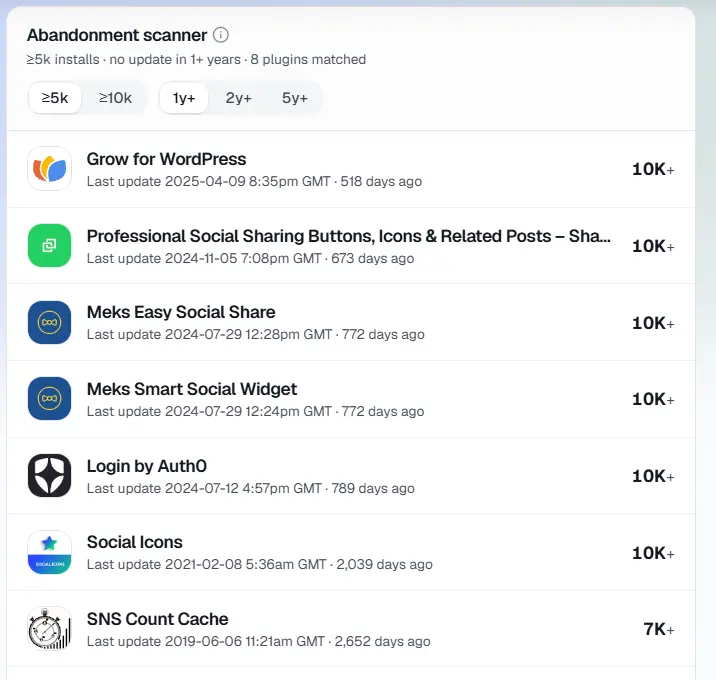
I see a crowded niche with a large stale-but-not-quite-abandoned group as a different opportunity than a crowded niche where everyone outside the top three is actively competing - the first has room forming underneath the surface; the second genuinely doesn't.
Step 5: Combine both seams into one specific target
The two seams compound. A shared complaint against the leaders, paired with several second-tier listings that are already fading, points at a specific, narrow feature worth building - one that beats the leaders on the thing they're all missing, in a niche where the middle of the pack isn't going to put up a fight.
I've clocked this pattern a few times: if both seams come up genuinely empty - no shared complaint, and the rest of the listings are actively maintained - that's a real result too. Treat it as confirmation the niche is a hard market right now, and revisit it later rather than forcing an angle that isn't there.
Watch for the trap of forcing a weak signal into a plan just because you've already spent the time working through the steps. I mark down a shared complaint that only shows up in one or two reviews out of hundreds as noise, not a real seam. The same goes for a "stale" listing that's actually just a mature, feature-complete plugin that doesn't need frequent updates. Read both seams for genuine weight, not just presence.
Step 6: Size whatever you find before committing
My instinct here is that whatever the two seams turn up is a build target, not yet a validated one. Run it through the full niche-research process before committing, the same as any other candidate.
Not the same move as reviving a specific abandoned plugin
Seam two and the abandonment scanner overlap with a related but different post: finding abandoned plugins as their own opportunity is about one specific quiet plugin - forking it, replacing it directly, or building a migration path for its existing users. Seam two here is broader: it's one input into a crowded-market strategy, used to gauge how much of the competitive field is actually still fighting, not a decision about any single plugin. Use that other guide when a specific stale listing is the target itself; use seam two here when you're reading the shape of the whole crowd.
Working the crowd
What if seam one turns up several complaints, not just one?
Prioritize the complaint that shows up across the most leaders, and the one closest to the category's core use case rather than an edge case - a shared gap in a rarely-used feature is a weaker opportunity than one in something most users touch regularly.
How many stale listings does seam two need to turn up to matter?
There's no fixed count - one stale listing with a meaningful install base is worth more than ten stale listings with almost none. Weight seam two by installs at stake, not by how many listings show up on the scan.
Can a crowded niche have neither seam?
Yes, and it's a legitimate outcome. A niche where the leaders are well-rated with no shared gaps, and the rest of the field is actively maintained, is a genuinely hard market right now - not every saturated niche has an opening waiting inside it.
Does StatWP flag both seams automatically?
The top-plugins-by-install-share view and the abandonment scanner sit in the same niche view in StatWP's Niche Research tool, so both seams are a couple of clicks apart rather than requiring separate tools - reading what they turn up is still on you.
Should I re-check the seams if I pass on a niche the first time?
Yes - both seams shift over time. A leader can ship a fix that closes a shared complaint, or a second-tier listing can slide from "quiet" into "genuinely abandoned" over a few months. A niche that came up empty on both seams six months ago is worth a fresh look, not a permanent skip.