
Validating a WordPress plugin idea with real market data means pulling four specific kinds of data - install trends, review sentiment, search demand, and competitive pricing - from the specific places each one actually lives, rather than treating "do some research" as one vague step.
This isn't a new version of the validation process. Our plugin research guide already walks through the eight steps in order, from writing down the problem to deciding whether to build. This is the reference sheet for which data source feeds which of those steps. If you're starting from zero candidates rather than validating one you already have, how to find profitable WordPress plugin ideas covers the five places those ideas actually come from first.
| Data type | Where it actually lives | What it answers |
|---|---|---|
| Install trend | Each plugin's WordPress.org page, or a plugin catalog like StatWP that tracks it over time | Is this specific competitor growing, flat, or declining |
| Review sentiment | WordPress.org's 1- and 2-star reviews, plus open support-forum threads | What are real users already frustrated about, in their own words |
| Search demand | WordPress.org's own directory search autocomplete, and general search-trend tools outside it | Are people actually looking for this, or only you |
| Competitive pricing | Each competitor's own pricing page, checked against a side-by-side compare view | What's already being charged, and for which specific features |
Two of these are worth flagging - they're the ones I see people get wrong most often. Install trend is the one people most often check as a single current number instead of a trend - a snapshot alone tells you almost nothing about direction, which is the entire point of checking it. And competitive pricing is easiest to get wrong by reading marketing pages instead of actual pricing tables, since marketing copy routinely blurs which features are free and which are gated.
The Short Answer: To validate a WordPress plugin idea with real market data, pull install trends, review sentiment, search demand, and competitive pricing from the specific places each one actually lives, rather than treating "do some research" as one vague step.
Walking one idea through all four checks
Say the idea is a plugin that automatically notifies WooCommerce customers when a backordered item ships - a real gap you noticed after fielding the same support question on three different client stores. Here's what pulling each row of the table above actually looks like for that one idea.
Install trend: is anyone already doing this well?
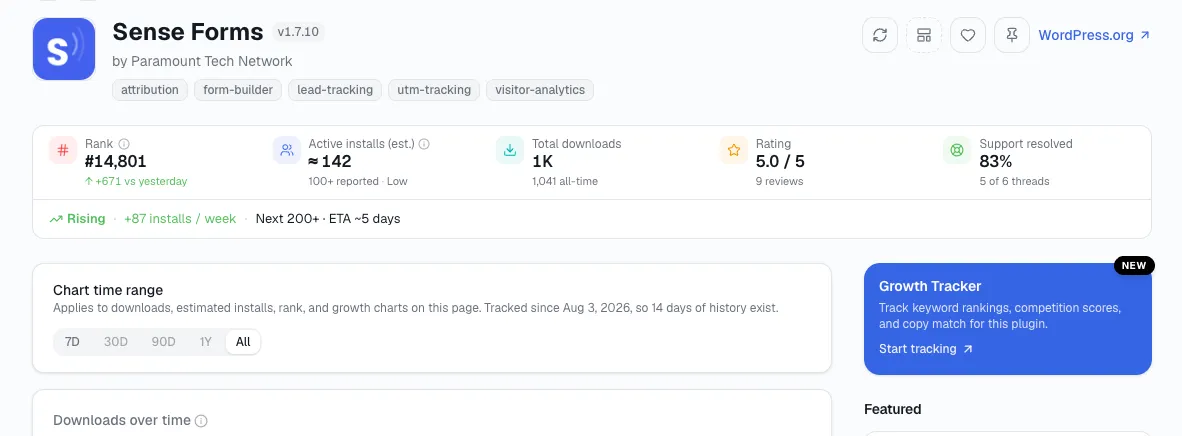
Open statwp.com/plugins and search "backorder." Two or three plugins turn up. One shows steady install growth over the last 90 days; the others are flat or declining. That single check alone has reshaped how I read an idea more than once - the growing one becomes the real competitor to study, not the others. The same check works for a theme idea, too - swap in statwp.com/themes and search the category instead.
Review sentiment: what does that growing competitor still get wrong?
Read its 1- and 2-star reviews next, since a plugin can be growing overall and still have a specific, repeated complaint hiding in its worst reviews. For the backorder idea, that might turn out to be "notification only fires once, doesn't remind again if the item is still delayed a week later" - showing up in multiple reviews, worded differently each time. I don't read that as a reason to skip the idea - it's the specific angle that makes a new entrant worth building instead of a copy.
Search demand: is anyone actually typing this into a search bar?
Check WordPress.org's own directory autocomplete for "backorder notification" and similar phrasing, then cross-check outside the directory with a general search-trend tool. If both show real, consistent interest rather than a one-off spike, the demand side of the idea holds up. If neither shows meaningful volume, that's worth knowing before writing a line of code, not after.
Try more than one phrasing before concluding either way. "Backorder notification" and "out of stock email" can describe the same feature to two different site owners, and checking only one of them risks reading real demand as none at all. Run each phrasing through both the directory autocomplete and the outside search-trend tool before you treat the result as settled.
Competitive pricing: what would customers already expect to pay?
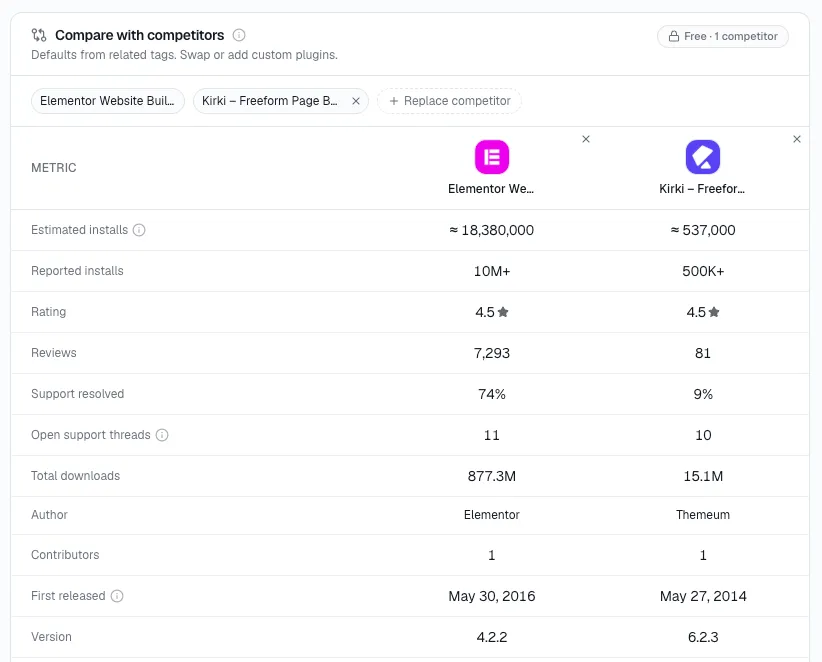
Open statwp.com/tools/compare, add the growing competitor (plugin or theme) and any others in the space, and their pricing tiers line up side by side instead of hunting through separate marketing pages. For a narrow feature like backorder notifications, I usually find this reveals whether the market expects a standalone low-cost tool or a feature bundled into a larger WooCommerce toolkit - which shapes how the new plugin should be priced and scoped, not just whether to build it.
The gap a healthy trend line can hide
None of these four data types replace each other, in my experience - a plugin can show a healthy install trend and still have a repeated, unaddressed complaint in its reviews, and that gap is exactly what you're looking for, the way the backorder example above found its actual opening in the reviews, not the install chart. Pull all four before you reach step 8 of the validation process and decide whether to build. The first and last rows, you can pull straight from StatWP the way shown above; the middle two still take reading actual reviews and actual pricing pages by hand.
Common Questions About Validating an Idea
Do I need all four data types, or can I skip one if the others look strong?
Pull all four data types - I pull all four, every time. The backorder-notification example walked through earlier in this guide is exactly why: the install trend alone looked fine, and the actual opportunity only showed up once the reviews were read too. Skipping a row means skipping the one place the real answer might be sitting.
What if the install trend looks flat for every competitor?
A flat trend across the whole category is itself a data point, not a dead end - it can mean the category has plateaued, or that none of the current plugins are worth the install yet. Read it alongside review sentiment before drawing a conclusion either way.
How recent does review data need to be to count?
Weight recent reviews more heavily than old ones. A complaint from three years ago may already be fixed; a complaint repeated in reviews from the last few months is the one worth building around.
Is search demand the hardest of the four to check?
Search demand is the one StatWP doesn't cover directly, since it's not first-party WordPress.org data the way install trend or a plugin's (or theme's) own pricing page is - it takes checking directory autocomplete and an outside search-trend tool by hand, which is exactly why it gets its own row in the table above instead of being folded into another one.
Once I've pulled all four, what decides go versus no-go?
Step 8 of the full validation process decides go versus no-go, not this reference sheet - it weighs all four data types together rather than any single one crossing a threshold on its own. See the plugin research guide for how that final call gets made.
Can StatWP pull all four data types for me automatically?
No, and I'll be direct about that. StatWP covers install trend and competitive pricing well - the two rows this guide shows with screenshots. Review sentiment and search demand still take reading actual reviews and running actual searches by hand - there's no shortcut around either one yet.
Pull the install trend and pricing rows straight from StatWP, then set aside time for the two rows that still take manual reading before you commit to building anything.