
A successful WordPress plugin solves one specific problem completely, gets maintained on a real cadence rather than a panic-update cycle, resolves support requests fast enough that frustrated users don't leave before hearing back, and shows a growth signal that holds up once you check it properly.
I've found none of those four traits are about the code being well written. Plenty of technically solid plugins fail on one of these anyway, and plugins with rougher code succeed by getting all four right.
Open statwp.com and search any plugin (or theme) you're studying - its overview page lines up install growth, update recency, and rating trend together, so you can test whether it actually clears these four bars instead of assuming it from its reputation.
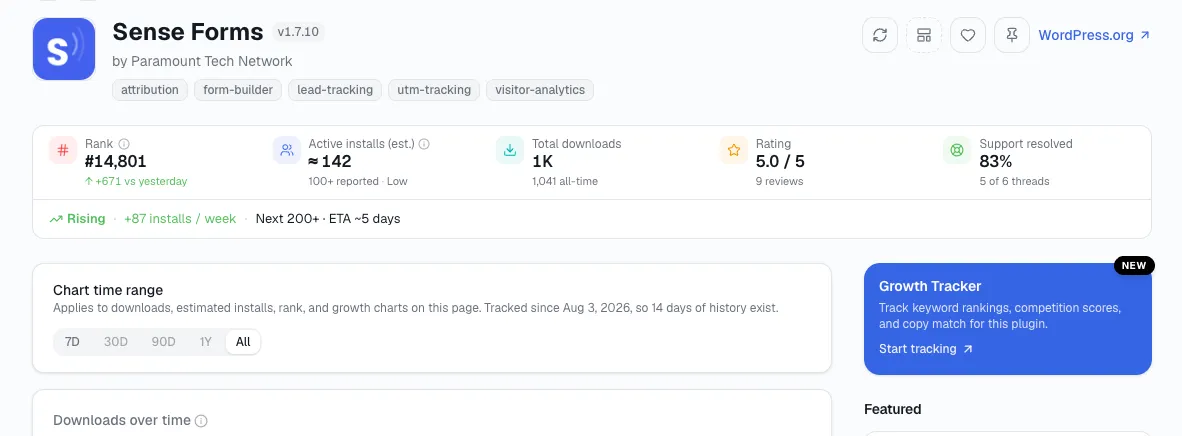
In a nutshell: What makes a WordPress plugin successful is solving one problem completely, shipping updates on a real cadence, resolving support requests fast, and showing a growth signal that holds up once you check it properly - none of which is really about how well the code is written.
Do one thing well, not three things badly
The plugins that hold onto users are narrow on purpose. A plugin that tries to be a forms tool, an analytics tool, and a marketing tool at once usually does a mediocre job of all three, and loses to a competitor that only does one of those things but does it without gaps.
I've watched users forgive a narrow plugin for not doing everything. They don't forgive a broad one for doing the one thing they needed poorly.
A few signs a plugin has drifted from this rule:
The changelog lists features that have nothing to do with the plugin's original name or description.
The settings page has grown past what a new user could reasonably configure in one sitting.
Support threads increasingly ask "how do I turn off" a feature, rather than "how do I turn on" one - a sign the plugin added scope nobody asked for.
Ship small updates - don't wait for a panic
Roughly 59% of the plugins listed on WordPress.org haven't shipped an update in over two years, per WP Tavern's analysis of directory data - which means simply shipping small, regular updates already puts a plugin ahead of most of its listed competition before a single new feature ships.
A plugin that updates every 6-8 weeks reads as alive to me in a way a plugin that goes quiet for a year and then pushes one panic security fix never does, even if the panic fix is technically well executed. What a healthy cadence actually looks like in a plugin's own changelog:
Small, frequent version bumps (x.x.1, x.x.2) rather than long gaps followed by a single large jump.
Compatibility updates that land within a few weeks of a new WordPress major, not months after.
Changelog entries that mention specific bug fixes, not just "performance improvements" repeated release after release with no detail.
Answer fast, or lose them to whoever does
The average response time across free WordPress.org plugin support forums is roughly 1.3 days, per CreativeMinds' research on plugin support response times. A plugin that consistently beats that number keeps users who would otherwise give up mid-frustration and leave; a plugin that consistently misses it loses them to whichever competitor answers first, regardless of which plugin is actually better.
Here's the rough way I read a plugin's own support forum before relying on it:
Under a day - genuinely responsive, a strong signal on its own.
One to three days - normal for a small team, still acceptable.
A week or more, or threads with no reply at all - a real warning sign, especially if it's the pattern across most recent threads rather than one unlucky ticket.
Make sure the growth is real, not just downloads climbing
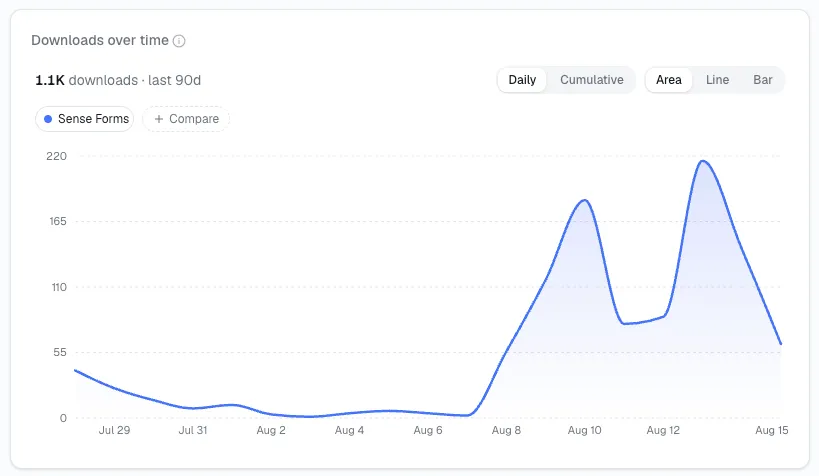
A rising download count and a rising active-install count are not the same evidence of success - downloads only ever go up, so a plugin can look like it's growing while its real, active user base quietly shrinks underneath that number. Telling the two apart is its own skill, and it's worth checking before you treat any plugin - including a competitor you're sizing up, or your own - as proof of anything.
Put the four traits on one scorecard
I've found checking a plugin one trait at a time is slower than it needs to be. Here's the same four traits as a quick reference - what a pass looks like, and what a red flag looks like, for each one.
| Trait | Quick check | Red flag |
|---|---|---|
| Narrow scope | The plugin's description still matches what it actually does today | Settings page has grown well past what the original description promised |
| Maintenance cadence | A version bump within the last 6-8 weeks | No update in over a year, or one panic release after a long silence |
| Support responsiveness | Recent support threads answered within a day or two | Multiple recent threads with no reply at all |
| Real growth | Active installs trending up over the last 90 days | Downloads climbing while active installs are flat or falling |
Quick Answers on What Makes a Plugin Succeed
Does a plugin need all four traits, or is one enough?
All four, in practice - I've seen plugins survive being weak on one trait for a while, but a plugin failing two or more at once is usually the one that ends up losing active installs within a few months.
Can a plugin with a low rating still be succeeding by these traits?
Yes, if the rating is old and the more recent signals - update cadence, support speed, active-install trend - are all healthy. A stale low rating from years ago matters less than what's happening in the plugin right now.
Is a big feature list ever a good sign?
Only if every feature in it still serves the plugin's original, narrow purpose. A big feature list built by staying in one lane for years reads differently than one built by chasing every request that came in.
How do I check these traits for a plugin I'm not building yet, just studying?
I check it the same way as a competitor: open its StatWP overview page and look at install growth, update recency, and rating trend together - the same three-signal check covered earlier in this guide - before forming an opinion from its reputation alone.
Which of these four traits matters most for a brand-new plugin with no track record yet?
Scope. You can't prove a maintenance cadence or a growth trend on day one, but you can control how narrow the plugin stays from the start - and that decision shapes whether the other three traits are even achievable later.
Check for all four before you copy a competitor
These four traits are easier to check for in an existing plugin than to guarantee in a new one, but they're exactly what our plugin research guide's validation process is built to surface before you build - a narrow problem, real maintenance gaps in the competition, and genuine growth instead of a plateau.
Now you've got the four traits to check on any plugin or theme - your own, or one you're sizing up. The specific data points that separate real growth from a plateau - install trend, review sentiment, search demand, competitive pricing - are covered in more detail in how to validate a WordPress plugin idea with real market data.