
Comparing WordPress plugins beyond ratings and active installs means pairing each of those two familiar numbers with the specific signal that catches what it misses - momentum next to installs, review recency next to the rating average - because both numbers, checked alone, describe a plugin's past more than its present.
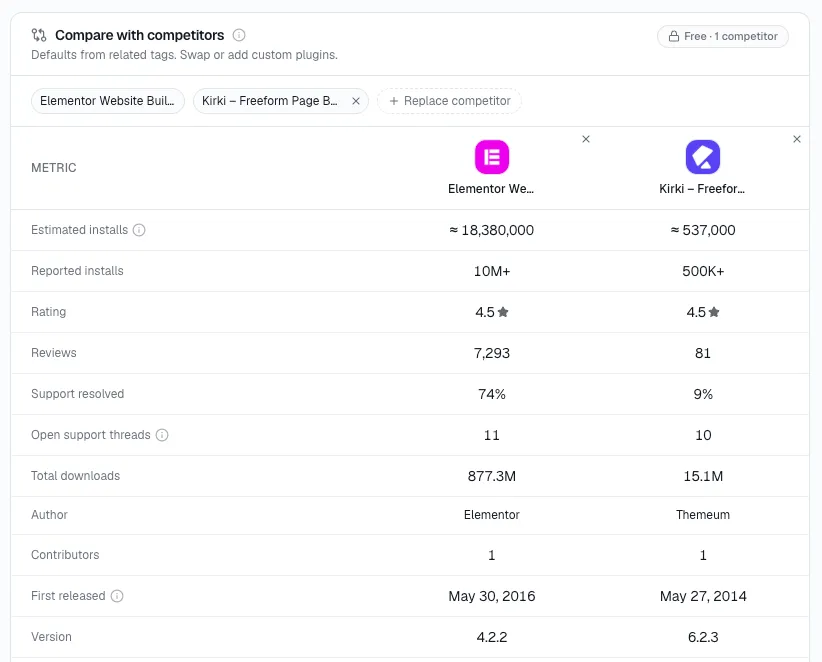
Every signal below - installs, momentum, ratings, version distribution, requirements - is a column in StatWP's compare tool for plugins and themes alike, which is what makes lining several of them up on all of them at once realistic.
Why two people can look at the same numbers and disagree
Ratings and installs are the two numbers every plugin listing shows up front, so they're also the two numbers most comparisons stop at. In my view, the problem isn't that they're wrong - it's that each one is a single snapshot, and a snapshot alone can't tell you whether you're looking at a plugin on its way up or one coasting on an old peak.
I've found pairing each snapshot number with a second signal that adds direction or recency is what turns a comparison from "who has more" into "who's actually ahead right now." That's the method this post covers - not a longer list of metrics, just the right partner for the two everyone already checks.
Installs tell you size. Momentum tells you direction.
Two plugins can show similar install counts and mean opposite things about where they're headed. Installs is a snapshot; momentum is whether that snapshot is trending up and accelerating, up and slowing, or already reversing. My rough rule of thumb: comparing plugins on installs alone ranks them by history; adding momentum ranks them by what's actually happening now.
Two plugins with 40,000 active installs each can be on completely different trajectories - one still gaining a few hundred a week, the other flat or slipping since a competing plugin picked up steam. The install count won't show you which is which. Momentum will.
Ratings tell you sentiment. Recency tells you if it's current.
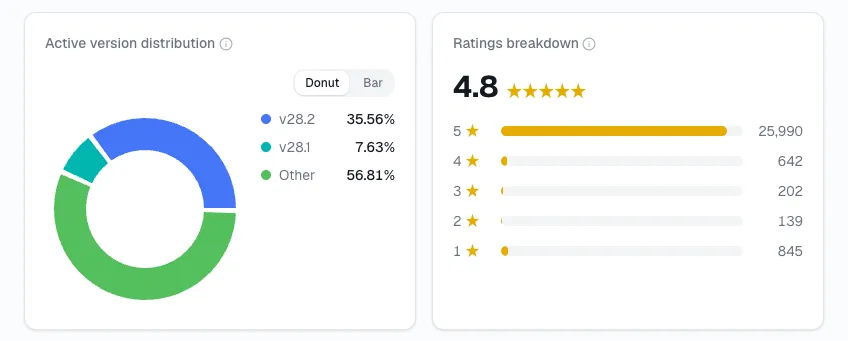
A 4.8-star average sitting on reviews from two years ago describes a plugin's reputation at that time, not necessarily today. Pair the average with how many reviews have landed in the last month or two - a rating that's both high and recently reinforced is a much stronger signal than the same number sitting untouched.
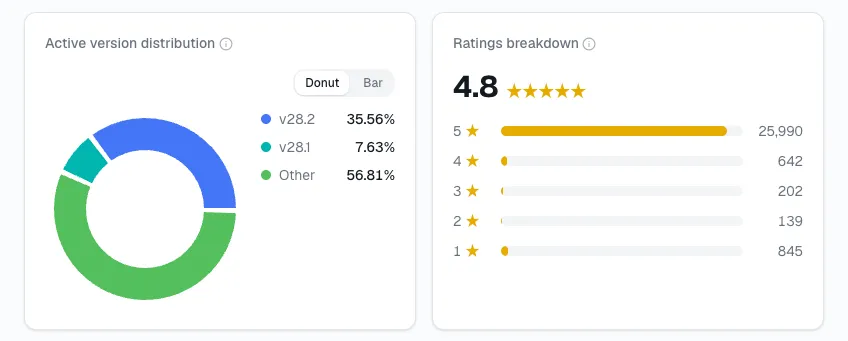
I've seen this happen enough times to trust it: a plugin that stopped shipping updates two years ago can still carry a high star average, because old reviews don't expire or get re-weighted. If almost nothing has been written about it since, that average is describing a plugin that may no longer resemble the one currently installed on someone's site.
Two signals that don't come up naturally at all
Version distribution and requirements rarely make it into a casual comparison, because neither shows up on a simple side-by-side of stars and install counts. Version distribution shows how fast a competitor's own users adopt updates - relevant if you're betting on a new feature actually reaching most of their base quickly once they'd need to switch. Requirements set a real cap on how many sites can actually install a plugin: one requiring a recent PHP version is out of reach for a meaningful share of live WordPress installs, regardless of how impressive its install count looks in isolation.
Pairing every metric that's worth checking
| Snapshot number | What it shows alone | Pair it with | What the pair reveals |
|---|---|---|---|
| Active installs | Current size only | Momentum | Whether size is growing, flat, or shrinking |
| Rating average | Historical sentiment, unweighted by time | Review recency | Whether that sentiment still reflects the current plugin |
| Version distribution | Rarely checked at all | Release activity | How fast a new feature would actually reach their base |
| Requirements | Rarely checked at all | Active installs | The real addressable ceiling behind the install count |
Putting the full set side by side
Open StatWP's compare tool and add the plugins - or themes - you want to size up. Once they're in, here's what lines up as columns, with no manual reconstruction from separate plugin pages:
- Installs and Momentum side by side, instead of just the raw count.
- Rating average and Review recency, so a high rating from two years ago doesn't get mistaken for one earned this month.
- Version distribution - how fast each plugin's own users update.
- Requirements - the PHP and WordPress minimums each one actually needs.
The full 11-signal scorecard covers the rest of what a plain ratings-and-installs glance leaves out entirely. Even that full scorecard is still the numbers half of the picture - finding a competitor's actual strengths and weaknesses means pairing it with their reviews, positioning, and where their feature list actually gates.
Comparing a market versus comparing yourself
Everything in this post so far is about reading any set of plugins correctly, your own not included. Once you know which pairs actually matter, running the exact same pairs against your own plugin - on the same day, next to a specific competitor - is a related but distinct exercise. That's covered separately in how to benchmark your WordPress plugin against competitors, which uses this same set of signals but points them at yourself instead of at a general market read.
Quick answers to what comes up most
Is momentum the same thing as growth rate?
They're related but not identical. Growth rate tells you the size of the recent change; momentum tells you whether that rate of change is itself speeding up or slowing down. Two plugins can post the same growth rate this month and be headed in opposite directions once momentum is factored in.
How recent does a review need to be to count as "current"?
There's no universal cutoff, but reviews from the last one to two months are a reasonable current window - anything older is still useful context, just not proof that today's version of the plugin still earns the same reaction.
Do requirements actually matter if a plugin already has huge installs?
Yes, because installs measure who's already on board, not who still could be. A large install count next to a high PHP requirement means the growth ceiling is lower than the current size suggests - worth knowing if you're sizing up how much more room a competitor actually has to grow.
Which pair should I check first if I'm short on time?
Installs paired with momentum. It's the fastest single check for telling a plugin on its way up apart from one coasting on an old peak, and it's usually enough on its own to decide whether a competitor deserves a closer look at all.
Don't stop at the two numbers everyone else stops at
I'd call a comparison built on installs and ratings alone the same comparison anyone glancing at two WordPress.org listings side by side could make in thirty seconds. Pairing each number with the signal that adds direction or recency is what separates an actual read on where a plugin stands from a guess dressed up as one.