
Tracking your WordPress plugin competitors means checking a small set of fast-moving signals monthly and the full scorecard quarterly, on a fixed schedule you keep regardless of whether anything seems to be happening - because the point of tracking is catching a shift early, not confirming one after it's already obvious.
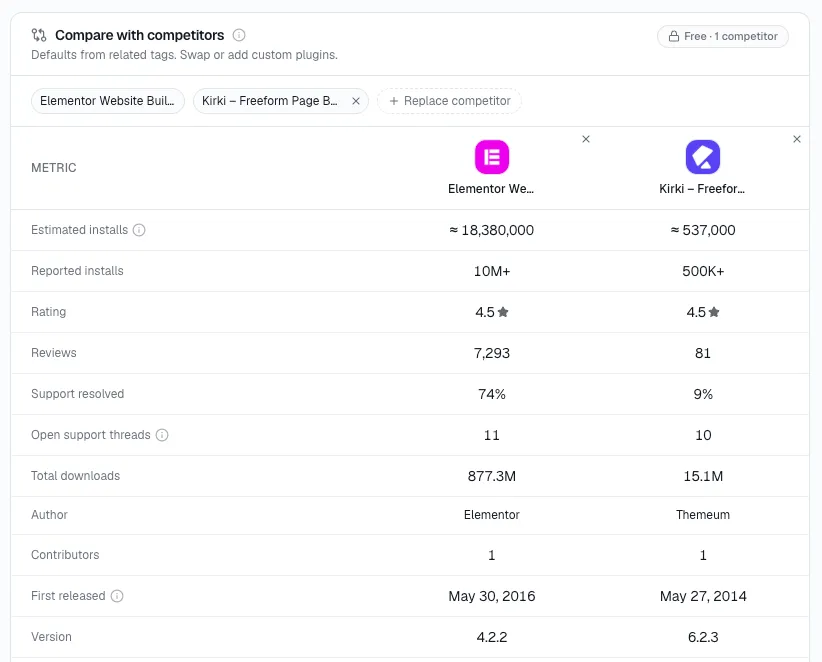
StatWP's compare tool holds installs, growth, momentum, and the rest of the scorecard for several tracked competitors - plugins or themes - on one view - the routine below is what to actually do with that view every month. It's also the same view you'd use to benchmark your own plugin against those same competitors once you're ready to add your own numbers to it.
Here's the quick take: To track your WordPress plugin competitors properly, check a small set of fast-moving signals every month and run the full scorecard once a quarter, on a fixed schedule regardless of whether anything looks like it's changing.
Why a fixed schedule beats checking "when something feels off"
Checking competitors only when you happen to think of them means you only ever notice a change after it's already large enough to be obvious - a competitor that's been quietly gaining for four months before you finally look. A fixed schedule catches the same shift after one month instead of four, which is the entire value of tracking over a one-off scorecard run.
The schedule also removes a bias that's easy to fall into without noticing: checking more often when a competitor is on your mind and going quiet on the ones that aren't. I've seen this show up more than once: a competitor who hasn't crossed your mind in months is often exactly the one worth a scheduled look, precisely because nothing has drawn your attention to them.
Monthly: the four signals that move fastest
Four signals move fast enough to deserve a monthly glance at your top three to five tracked competitors:
- Installs
- Growth %
- Momentum
- Release activity
I don't give these a deep read - I'm looking for a number that's moved enough to be worth a closer look, not analyzing it in full every time.
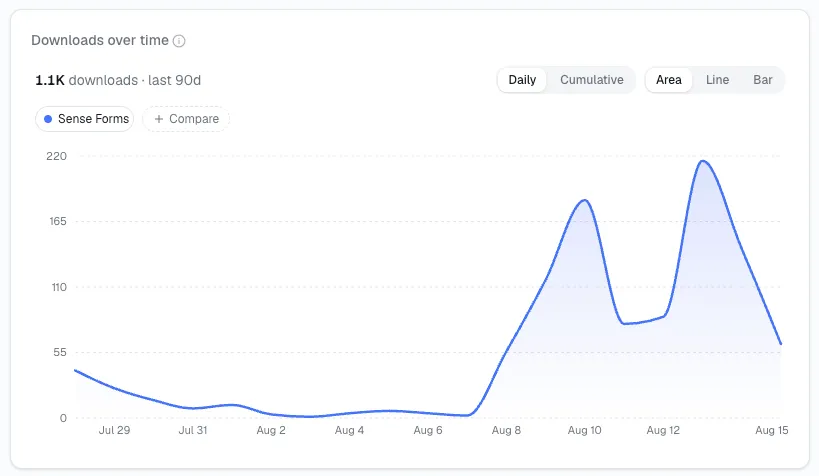
"Worth a closer look" has a rough shape to it. A single-digit shift in Growth % month over month is usually noise; I've clocked this happening before - most plugins wobble that much without anything real changing. What I've settled on: a move of ten points or more, or momentum flipping direction after several steady months, counts as the kind of change that's earned an actual investigation rather than a glance and a shrug.
Quarterly: the full scorecard
Once a quarter, or immediately after a competitor ships a major release or changes pricing, re-run the complete 11-signal scorecard. This is where rank, ratings recency, version distribution, requirements, and positioning get their real re-check - they move slower, but they're also the signals most likely to be genuinely different after several months rather than just noisy month to month. Rank in particular is worth a dedicated watch rather than waiting for the quarterly pass - see how to monitor changes in a competitor's WordPress plugin ranking as it happens, which covers the narrower question of what specifically moved their WP.org search position and why.
Event-driven checks that don't wait for the calendar
The monthly and quarterly cadence covers the routine case. A few events are worth breaking the schedule for and checking immediately, because waiting for the next scheduled pass means finding out too late to react:
- A competitor announces a pricing change. Re-check their positioning and feature gating right away, not at the next quarterly pass.
- A competitor ships a version bump that looks like a major release, not a patch. Their changelog and version distribution are worth a look within the week, not the month.
- A competitor's rating average moves more than a few tenths of a point in a short window. That's unusual enough on its own to be worth reading the new reviews directly.
Log what triggered a re-check, not just the numbers
Keep a short note next to your monthly log whenever something moves enough to deserve the closer look - a specific release, a pricing change, a review pattern shift. I've found a number that jumped without a written reason next to it is much harder to make sense of two quarters later than one with a one-line cause attached.
What this routine is and isn't
This is the broad, across-the-board check-in - a fixed set of signals, on a fixed schedule, across every competitor you track. It's deliberately not the place to dig into why one specific number moved. If Rank or a WP.org keyword position shifts during your monthly glance, that's the cue to switch over to the narrower rank-monitoring process, which walks through the specific, common causes - a readme rewrite, a tag change, a faster support response time - rather than repeating that diagnosis here.
Keeping this from becoming a chore
Open StatWP's compare tool once, add each competitor you're tracking - plugin or theme - and bookmark that view - Installs, Growth %, Momentum, and the rest of the scorecard sit there as columns every time you come back to it. That's what turns the monthly routine above into a five-minute revisit instead of a recurring afternoon of re-opening the same plugin pages one at a time.
Setting the routine up so it actually sticks
This is what tends to hold, from what I've watched: a tracking routine that lives only in your head rarely survives past the second month. A simple version that holds up:
- Pick a fixed day - the first Monday of the month, for instance - rather than "whenever I get to it."
- Keep the monthly log to four numbers per competitor - installs, growth, momentum, release activity - so the check genuinely takes minutes, not an hour.
- Put the quarterly scorecard re-run on the same calendar, a fixed number of months out, rather than trusting yourself to remember it's due.
- Write one line next to any number that moved, even if you're not sure yet what caused it - a placeholder note beats no note at all.
Questions about keeping this up over time
What if nothing changes for several months in a row?
Keep the schedule anyway. A quiet stretch is itself useful context - it tells you a shift, when it finally comes, is a real move and not just normal noise for that competitor.
Should every tracked competitor get the same amount of attention?
No - weight the monthly glance toward the two or three competitors actually growing or shipping the most. A competitor that's been flat for a year still deserves the quarterly scorecard, but doesn't need the same monthly scrutiny as one actively gaining ground.
How is this different from just running the scorecard once?
A single scorecard run is a snapshot. Tracking is the discipline of taking that same snapshot on a schedule so you can see the trend, not just the current position - the value comes from comparing this month's numbers against last month's, not from any one reading alone.
What's the minimum viable version of this if I only have a few minutes a month?
Installs and momentum for your top three competitors, glanced at once a month, is the smallest version that still catches a real shift early. Everything else in this routine - the quarterly scorecard, the event-driven checks, the written log - adds accuracy and context, but the monthly installs-and-momentum glance is the part that matters most if time is genuinely limited.