
Finding a gap in the WordPress plugin market means scanning across many categories at once for a specific mismatch - a tag with real search interest but few actively maintained results, a complaint repeated across several competing plugins that none of them fixed, or a category well represented in premium marketplaces but thin on WordPress.org - rather than starting from one niche you've already committed to.
That's a different, earlier step than sizing a specific niche, which assumes you've already got a boundary worth measuring. This is about generating that boundary in the first place, across a directory that - at 65,282 listed plugins, per WP Odyssey's plugin-count tracking - is too large to scan by browsing.
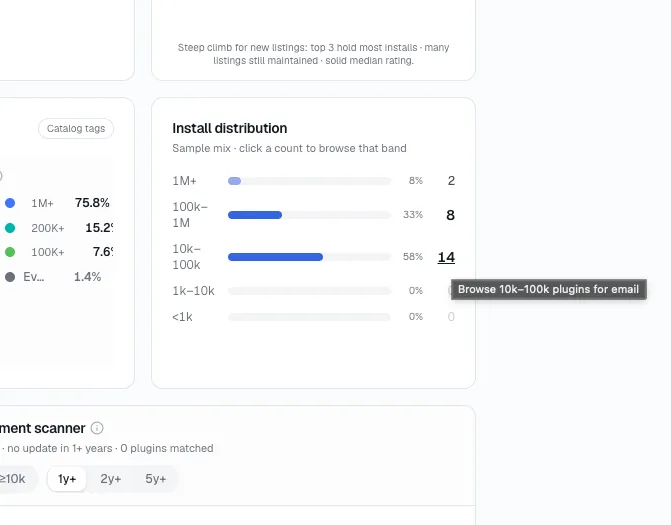
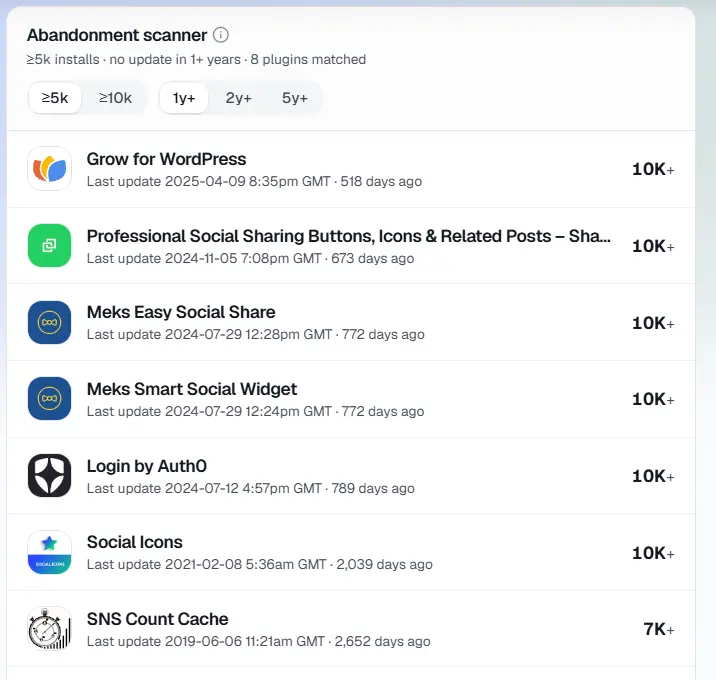
StatWP's Niche Research tool is built for exactly this kind of scanning - install distribution, top-3 concentration, and an abandonment scanner for any tag or category, plugin or theme - so you're not opening two dozen plugin pages by hand to spot the same patterns below.
Four ways to scan instead of browse
Tag mismatches
Some tags carry real search interest but return a thin list of actively maintained results - the mismatch itself is the signal. A tag returning thirty results where twenty-eight haven't shipped an update in two years isn't a crowded category; I've caught this pattern before — that's a category that only looks crowded until you check.
To scan for this directly: open the Niche Research tool, type in a tag you're curious about, and look at two numbers side by side - the total result count, and how many of those results the abandonment scanner flags as stale. A tag with 30 results and 4 active ones is a very different opportunity than a tag with 30 results and 25 active ones, even though both look identical from the raw count alone.
The same complaint on multiple competitors
Read the 1- and 2-star reviews across every plugin in a category you're scanning, not just one. A complaint that shows up on a single plugin is that plugin's problem. The same complaint showing up on three or four unrelated plugins in the same space is the category's problem, and none of them have fixed it.
Here's the workable pass I run: open the top five results for a tag, skim only the 1- and 2-star reviews on each (skip the 5-star ones entirely for this exercise), and write down the actual complaint in a few words each time. If the same short phrase - "doesn't work with X," "no way to Y," "breaks on multisite" - shows up under three or more unrelated plugin names, that's the gap, not any one plugin's specific flaw.
Core proposals that got deferred, not rejected
WordPress core regularly discusses features that don't ship - deferred rather than rejected, often because the use case was judged too narrow for core but real enough to keep coming up. A feature proposal that resurfaces across multiple WordPress versions without shipping is effectively core telling you the plugin space, not core, is where that specific problem gets solved.
Make WordPress Core is where these discussions actually happen - proposal posts, ticket threads, and the eventual "not for core, but a great plugin idea" verdict that some of them land on explicitly. Searching that verdict phrase, or scanning meeting notes from the last year or two, surfaces exactly this kind of deferred-not-rejected feature.
Premium-only categories
Some categories are well served on premium marketplaces - CodeCanyon-style plugin stores, ThemeForest-style theme marketplaces - but thin on WordPress.org itself. That split can mean real demand exists but nobody's served the free-and-freemium segment of it yet - or it can mean the problem genuinely needs a paid feature set to solve properly. Checking which one it is takes an actual look at what the premium version does that a free plugin realistically couldn't.
The practical test: list the premium plugin's actual feature set, then ask which of those features genuinely require ongoing infrastructure (an API, a paid service, licensed data) versus which ones are just gated behind a paywall for revenue reasons. A premium plugin that's mostly paywalling straightforward functionality is a much softer competitor than one that's genuinely built on a paid dependency.
What each signal actually tells you
The four scans above turn up different kinds of evidence. I find it helps to know which is which before acting on one:
| What you spot | What it usually means |
|---|---|
| High result count, mostly stale by the abandonment scanner | An open tag - active competition is thinner than the raw count suggests |
| The same complaint across unrelated plugins | A feature gap the whole category shares, not one plugin's specific weakness |
| A feature request that resurfaces across core versions without shipping | Core has effectively pointed the use case at plugins, not itself |
| Strong premium-marketplace presence, thin WordPress.org presence | Either an underserved free tier, or a feature set that genuinely needs a paid dependency - check which before assuming |
Before You Start Scanning: Quick Answers
How many categories should I scan before picking one to dig into?
Scan more than one - I always run several before committing to any single tag. Scanning is cheap compared to building, so run the Niche Research tool against several plugin or theme tags in an area you're curious about before narrowing to the one that shows the clearest mismatch.
Do I need a specific niche in mind before I start this process?
No - scanning without a preset niche in mind is the whole point of this process. Starting with one niche you've already committed to skips the step where you'd have found a better one. Pick a broad area of interest, then scan several tags inside it.
What's the difference between a tag mismatch and a category that's just genuinely crowded?
A tag mismatch looks crowded by result count alone but turns out thin once you check how many results are actually maintained. A genuinely crowded category stays crowded even after that check - most of the results are active, updated, and still competing for the same installs.
Can StatWP tell me whether a gap is real demand or a legitimately hard problem?
Not directly - StatWP's tools point you at the mismatch, but reading why it exists (a paid dependency, a technical limitation, genuinely low demand) still takes the manual check described above for premium-only categories.
What do I do once I've found a real gap?
A gap found this way is a category worth sizing, not yet a plugin worth building. Narrow it down with a niche-sizing pass, and once you've settled on a specific idea inside it, validate that idea against real WordPress.org data before committing engineering time to it.
From gap to candidate
This matches a pattern I keep seeing: a gap found this way is a category worth sizing, not yet a plugin worth building. If what you found looks more like installs locked up by one or two players than a thin category, the more precise read is how to find underserved WordPress plugin niches. Run it through the niche-sizing process linked above, and once you've narrowed to a specific idea inside it, validate that idea against real WordPress.org data using the plugin research guide before you commit engineering time to it. If you'd rather start from a specific candidate you already have in mind instead of scanning categories first, how to find profitable WordPress plugin ideas covers the five places those ideas actually come from.